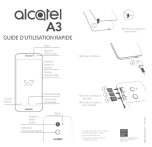
1 Enlever ou replacer le cache arrière. GUIDE D’UTILISATION RAPIDE Flash Appareil photo avant 2 Charger la batterie. Monter/ baisser le volume Touche Marche-Arrêt 5.0” * SIM2 Touche Accueil Touche Retour Touche Vue d’ensemble Détecteur d’empreinte digitale 4 Insérer ou extraire la carte SIM. SIM1 SD Installer ou retirer la carte microSD. Flash Le Guide d’utilisateur et une rubrique FAQ sont disponibles en ligne www.alcatel-mobile.com * Disponible uniquement pour le modèle double SIM. ÉCONOMISEZ LE PAPIER, SAUVEZ DES ARBRES PENSEZ A L’ENVIRONNEMENT AVANT DE LANCER UNE IMPRESSION Français - CJB29H0ALABA Appareil photo arrière 3 ">
/
Download
Just a friendly reminder. You can view the document right here. But most importantly, our AI has already read it. It can explain complex things in simple terms, answer your questions in any language, and help you quickly navigate even the longest or most compilcated documents.